
To claim a business in ChatGPT Business Hub, sign in to ChatGPT, open Business Hub, search for the business name, verify the claim and then pass an identity check. For a business outside the United States the first screen decides the outcome. In seopaslaugos.io's tests on Lithuanian projects in November 2026, picking a listing with a street address put the project on a waitlist, while choosing "Create" with the business name led through to verification.
- Sign in to ChatGPT on the web and open Business Hub.
- Search for the business and choose "Create" with its name, not a listing with a street address.
- Answer the delivery and returns questions truthfully.
- Leave the phone and email fields empty for now.
- Verify the website domain with a DNS TXT record.
- Pass the identity check with a passport or ID card.
- Invite the agency or teammates as admins.
What is ChatGPT Business Hub?
ChatGPT Business Hub is the place inside ChatGPT where a business claims its listing, manages its details and sees how people engage with it. OpenAI launched it in beta on November 10, 2026. The Hub has three parts: the business profile, the insights, and for some businesses a business agent that answers customers' questions.
-
Separate from ads and paid plans. OpenAI states that claiming a business, publishing an agent and advertising are separate, and that no Ads account or ChatGPT Enterprise agreement is needed to claim.
-
The listing can exist without a claim. Under OpenAI's terms a business listing may be created and shown whether or not the business claims it.
-
The agent is US-only for now. Business agents are available to eligible ecommerce and online service businesses in the US with a website.
Who can claim a business in ChatGPT Business Hub?
A business can be claimed by its owner or by a person authorised to represent it, where ChatGPT is available and the required verification is supported. Availability depends on the business's location and type, so for a business outside the US the route of the claim matters.
-
Local stores and restaurants. OpenAI's help centre says they "can currently claim only an existing U.S. listing".
-
Online businesses. An eligible online business "may see an option to add it".
-
A website is required. Claiming is initially available to eligible businesses with a website.
How to claim a business in ChatGPT Business Hub: 7 steps
The steps below follow OpenAI's own setup instructions. Several of them add what seopaslaugos.io saw when claiming Lithuanian projects in November 2026, and each such line names seopaslaugos.io as its source.
1. Sign in and open Business Hub
Business Hub opens from the sidebar of ChatGPT on the web, after signing in. The first screen is a search box: type the business name or the domain.
-
Use the owner's account. The account that claims the business becomes its admin, and that admin adds teammates later.
-
One brand, one claim. Each distinct brand is managed separately, and claiming the main brand does not claim its locations.
2. Choose "Create", not a listing with a street address
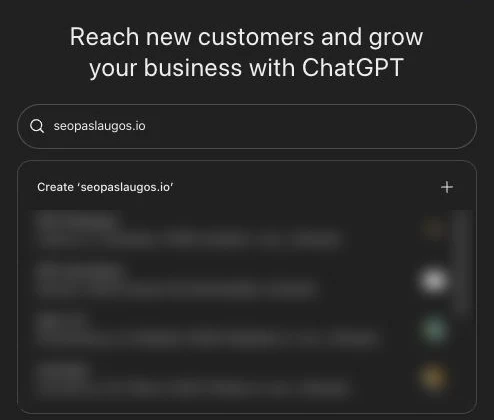
The search shows two kinds of result: a first row that reads "Create" followed by the name typed in, and below it existing listings with street addresses. In seopaslaugos.io's tests on Lithuanian projects, every project claimed through a listing with a physical location went to a waitlist. Projects started through "Create" went on to verification without a waitlist.
-
Why this happens. OpenAI does not explain it, but its rule that local stores and restaurants can claim only an existing U.S. listing fits what the tests showed.
-
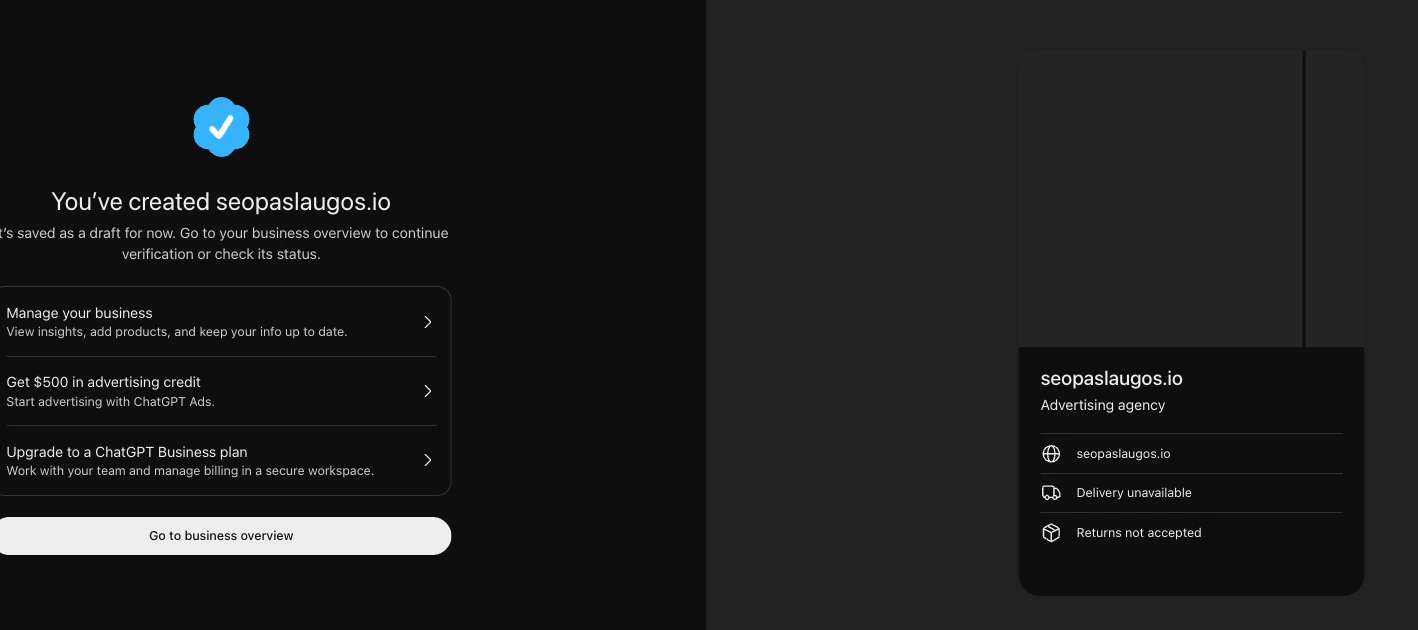
What "Create" does. A new profile is saved as a draft, and the Hub then asks to continue verification.
3. Answer the delivery and returns questions truthfully
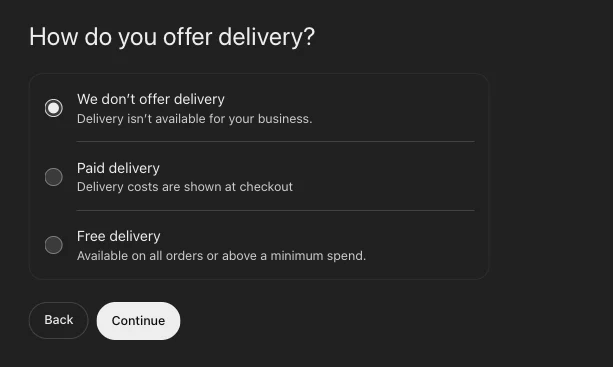
After "Create", Business Hub asks how the business offers delivery and what its return policy is. A service business has honest answers to both: "We don't offer delivery" and "Returns not accepted".
-
The answers are shown publicly. The profile preview lists "Delivery unavailable" and "Returns not accepted" under the business name.
-
Accuracy is a rule. OpenAI's Businesses in ChatGPT policy requires that information added "must truthfully represent the business and be kept current".
4. Leave the phone and email fields empty for now
The phone number and email address fields on the profile are marked optional. In seopaslaugos.io's tests in November 2026 these two fields produced errors, so the working route was to skip them and add them later.
-
Not the same as verification. Phone and business email also exist as verification methods; skipping the profile fields does not block the domain method in step 5.
5. Verify the website domain with a DNS TXT record
The new profile is "saved as a draft" until the claim is verified. OpenAI's verification methods, offered depending on the business, include phone, business email, website domain and Shopify. For the domain method, add the TXT record shown in ChatGPT to the domain's DNS settings, then return to ChatGPT and select Verify domain.
-
Copy the record exactly. The OpenAI help centre says to copy "the type, name or host, and value exactly".
-
Someone else manages the domain. Ask that person to add the record; DNS changes may take time to appear.
-
No file or meta tag. OpenAI documents only the DNS TXT record for a website, so the Search Console habit of uploading a file does not apply.
-
Then OpenAI reviews. OpenAI reviews the claim and emails its decision or a request for more information.
6. Pass the identity check
An approved claim only opens the business in Business Hub. Identity verification with Persona is required to publish changes to the business information, connect a product feed, view insights or create a business agent.
-
What to prepare. OpenAI says a government-issued ID, business registration information and proof of authority to represent the business may be needed. In seopaslaugos.io's cases the ID was a passport or an ID card.
-
Match the official records. The business name, address and any registration or tax number have to match the official business records.
-
Approval publishes a new profile. For a profile created through Persona, OpenAI's approval publishes it automatically, with no separate publishing step.
-
A published profile stays. Only unpublished draft profiles can be deleted, and OpenAI Support cannot delete, unpublish or hide a published one.
-
The blue check. The verified badge appears after Persona verification is approved, not after the claim alone.
7. Invite the agency or teammates
The admin who claimed the business can add teammates in Business Hub and grant an agency access to manage the business or its agent. The dashboard has an "Invite" button that opens "Invite business admins", where the admin adds an email address.
-
The owner claims, the agency is invited. In seopaslaugos.io's Lithuanian projects verification asked for a change in the domain settings and for the owner's ID, so seopaslaugos.io asks each client to claim the business and then send an invitation.
-
One account per person. OpenAI says to use each person's own ChatGPT account.
-
Workspace limits. For a business claimed in a ChatGPT workspace, invitees may need to be members of that workspace.
Why does ChatGPT Business Hub put a business on a waitlist?
ChatGPT Business Hub's waitlist is not explained on OpenAI's pages: the word "waitlist" does not appear on them. The help centre limits local stores and restaurants to existing U.S. listings and says availability depends on the business's location and type.
-
What the tests showed. On Lithuanian projects in November 2026, the waitlist appeared every time a listing with a physical location was chosen, and did not appear when the profile was started through "Create".
-
Rules may change. OpenAI's policy states that eligibility requirements may change over time.
What do the Business Hub insights show?
The Business Hub insights show aggregate activity over the past 28 days, including mentions and website clicks. OpenAI makes them available after both the claim and the Persona verification are approved. seopaslaugos.io saw the same order on its own projects: the numbers appeared after the ID check was approved.
-
Mentions, online business. A mention counts when ChatGPT references the business's website; the brand name alone does not count.
-
Mentions, local business. A mention counts when ChatGPT shows a result for that location, even if the customer does not open the listing.
-
Website clicks. How often people click through to the website.
-
Discovery topics. Common themes in the ChatGPT answers that mentioned or cited the business; individual prompts are not revealed.
-
A blank is not a zero. A blank metric can mean the activity has not reached the reporting threshold or the data is still being collected.
What does ChatGPT analytics look like in Business Hub?
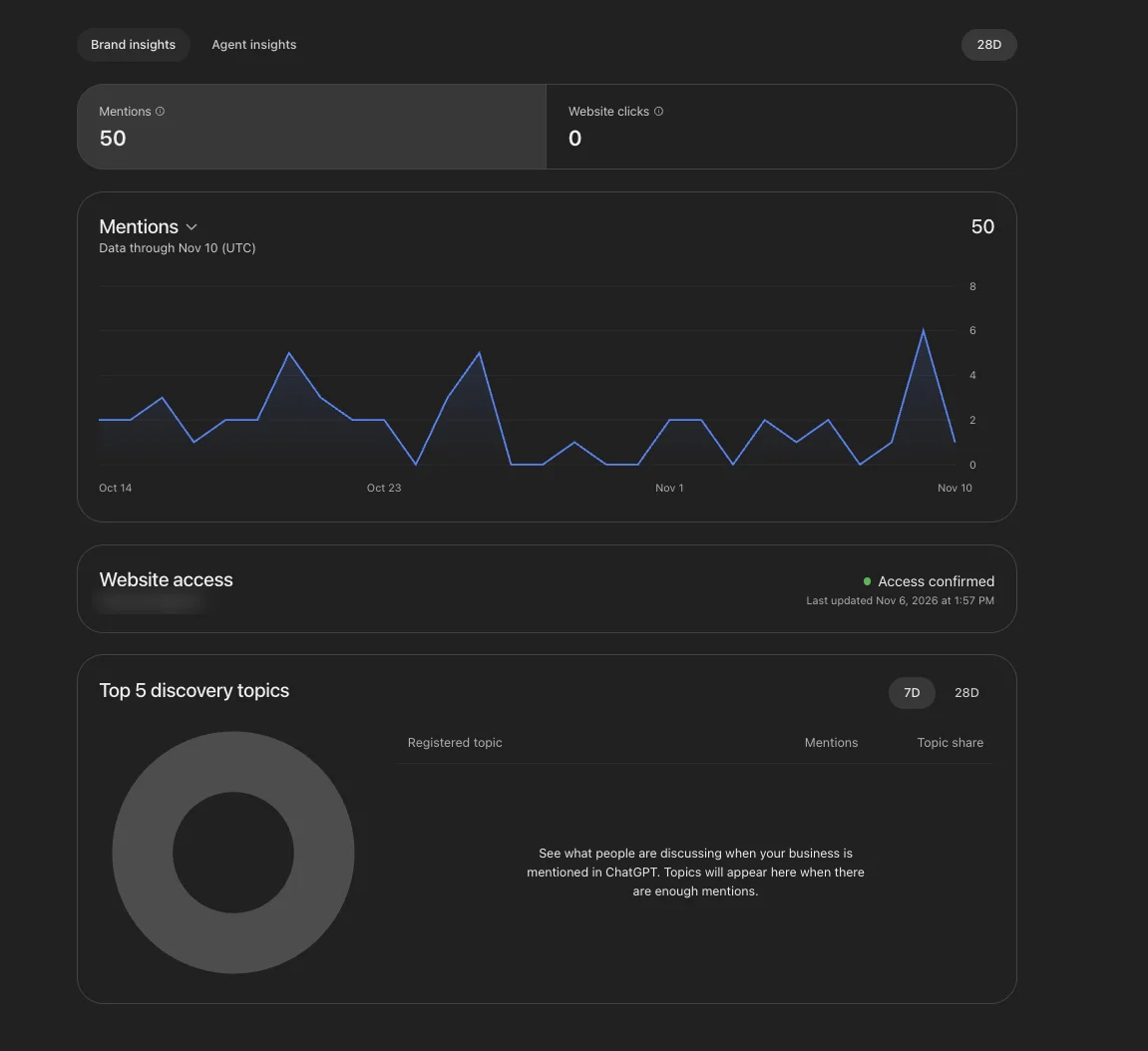
ChatGPT analytics sits in Business Hub under the "Brand insights" tab. For one verified project in November 2026 it showed 50 mentions and 0 website clicks over 28 days, with a daily chart from Oct 14 to Nov 10 that moved between 0 and 6 mentions. The "Top 5 discovery topics" block was still empty at that volume: its registered topic, mentions and topic share columns carried only the note "Topics will appear here when there are enough mentions."
Is the $500 advertising credit free?
No, the advertising credit is matched to spending, not given upfront. The last screen of the "Create" flow offers "Get $500 in advertising credit", and the public offer on ads.openai.com, read from the EU on 11 November 2026, says: "Get €500 ad credit on us when you spend €500. Offer ends December 31."
-
Credits do not count as spend. OpenAI's ad credit terms say credits "do not count toward any spending requirements".
-
Credits expire. Unless the offer states otherwise, ad credits expire 90 days after issuance.
-
Check the offer in the account. Each offer carries its own eligibility and spending requirements, and seeing an offer is a separate step from receiving the credit.
Does claiming make ChatGPT recommend the business more often?
No. In OpenAI's words, claiming "doesn't guarantee increased visibility or give you direct control over ChatGPT's independent recommendations", and advertising does not influence ChatGPT's independent answers either. Claiming gives two things: control over the details the business provides, and the insights. What moves recommendations is covered in the guide on how to get recommended by ChatGPT.